Universal Serial Bus (USB)
Universal Serial Bus (USB) is an industry standard that establishes specifications for cables, connectors and protocols for connection, communication and power supply (interfacing) between computers, peripherals and other computers.
- How does a USB keyboard work?- YouTube by Ben Eater
- More about USB than you ever wanted to know
- I learned how there are 4 pins, if it’s just for power, the data pins are not actually used. If you actually cut into the wire, there are only 2 wires
There’s shielding around the cable to prevent interference.
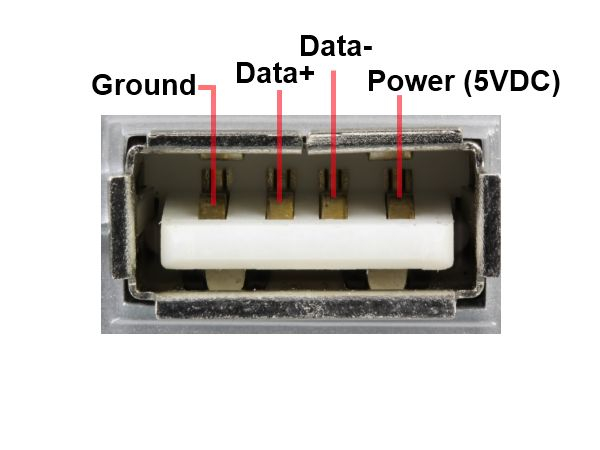
Is USB a protocol?
I don’t think so right? Because there are many ways in which data is transmitted through USB.
https://www.tuxera.com/blog/comparing-protocols-for-usb-devices-which-ones-more-significant/
Is USB polling or interrupt-driven?
USB uses a combination, but is fundamentally polling-driven at the bus level,
- Polling for Data: The USB Host Controller (HC) sends out periodic “tokens” to devices. For devices like mice and keyboards (HID - Human Interface Devices), this is a request to see if they have data (like a key press or mouse movement).
- Device Responds: If the device has data, it responds with the information during that scheduled time slot. This is often called an “Interrupt Transfer” endpoint, but it’s still a polled request.
- Interrupts for Events: The HC itself uses interrupts to signal the main CPU when a transfer is complete or an error occurs, so the CPU doesn’t have to constantly monitor the bus.
Different USB speeds
- USB 2.0 cables transfer data at ~0.048 GB/s = 4.8 MB/s
- USB 3.0 has transmission speeds of up to ~0.625 GB/s = 62.5 MB/s
- USB 3.1 at ~1.25 GB/s
- USB 3.2 takes advantage of all four lanes to achieve ~2.5GB/s
- USB 4.0 up to ~5 GB/s
Concepts
- Older USB’s have a Ferrite Bead.