Salsa Robot Pipeline
We will aim to use Mjlab, which expects a .csv file. Before we do this, we need to do retargeting so that we get a unitree trajectory to track.
“we use the same convention as .csv of Unitree’s dataset”.
- Video → 3d human mesh as a
.npz(convert with GVHMR) → retarget to withmink, get a.npyfile → convertnpyto.csvaccording to LAFLAN1
There’s some setup with the codebase that was extremely annoying, especially with GVHMR… multiple models downloaded, but the output is great!
pip install --index-url https://download.pytorch.org/whl/cu129 \
  torch==2.8.0+cu129 torchvision==0.23.0+cu129 torchaudio==2.8.0+cu129

pip install -U ultralytics
1. Extract human motion data from video as SMPL / SMPL-X
You can either use the GVHMR (https://github.com/zju3dv/GVHMR/tree/main) pipeline (used by KungfuBot) or TRAM (used by ASAP) pipeline.
I went ahead with GVHMR because there seemed to be some downstream issues with ASAP related to .pkl files, and not clear documentation, but they should both be the same thing.
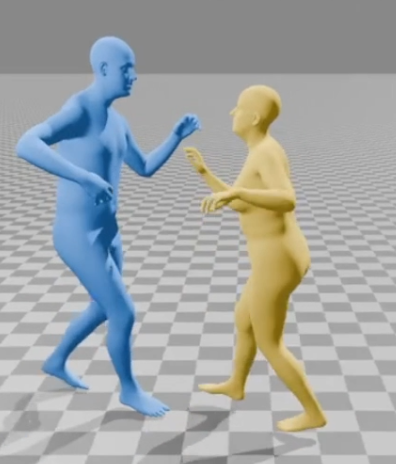
For this dataset, I had to first convert by using convert_smplx_to_smpl.py
python convert_smplx_to_smpl.py ~/PBHC/compas3d/
- The retargeted smpl files are stored in
~/compas3d/smpl
2. Retarget SMPL motion to Unitree G1
In the KungfuBot repo (PHBC), use this retargeting script. You should use my branch which has some extra scripts. I make some scripts that does this retargeting for you, I should not need to do this anymore.
Retarget to unitree g1
python mink_retarget/convert_fit_motion.py $COMPAS3D_ROOT_DIR/smpl Then, convert to the standard unitree csv format
python convert_npy_to_csv.py --input_dir $COMPAS3D_ROOT_DIR/smpl --output_dir ~/mjlab/
- question: check that its 30fps?
- put them right in mjlab
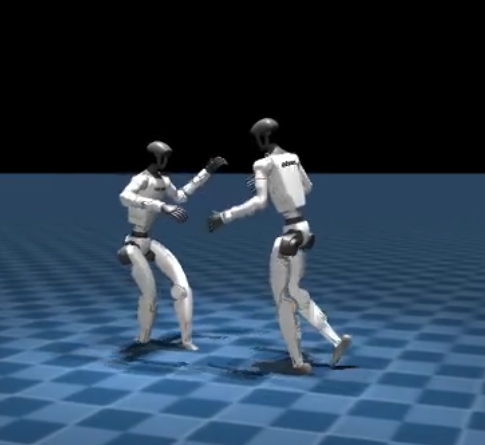
3. Training with motion
Setup wandb team
You need to set up wandb team to maek these works.
Then, we use mjlab code to visualize
MUJOCO_GL=egl uv run src/mjlab/scripts/csv_to_npz.py --input-file /home/claude/PBHC/smpl_retarget/retargeted_motion_data/csv/Pair5_song2_take1_follower_smpl.csv --output-name salsa-follower-pro --input-fps 30 --output-fps 50 --render
- this upsamples from 30fps to 50fps
The .npz files are stored in `mjlab/artifacts/.
I added support for the salsa to see two robots dancing together!
MUJOCO_GL=egl uv run src/mjlab/scripts/csv_to_npz.py --input-file /home/claude/PBHC/smpl_retarget/retargeted_motion_data/csv/Pair5_song2_take1_follower_smpl.csv --input-file-2 /home/claude/PBHC/smpl_retarget/retargeted_motion_data/csv/Pair5_song2_take1_leader_smpl.csv --output-name "pair5_salsa" --input-fps 30 --output-fps 50 --render --video-height 720 --video-width 1280
Should we check that our input fps is 30?
like ideally this should be autodetermined?
MUJOCO_GL=egl uv run src/mjlab/scripts/csv_to_npz.py \
    --input-file /home/claude/mjlab/Pair5-g1_retargeted_npy/Pair5_song2_take1/Pair5_song2_take1_follower.csv \
    --input-file-2 /home/claude/mjlab/Pair5-g1_retargeted_npy/Pair5_song2_take1/Pair5_song2_take1_leader.csv \
    --output-name "pair5_salsa_test" \
    --input-fps 30 \
    --output-fps 50 \
    --render \
    --robot-offset 0.0 0.0 0.0 \
    --line-range 1 150
To debug, you can use --line-range flag, i.e.:
  MUJOCO_GL=egl uv run src/mjlab/scripts/csv_to_npz.py \
    --input-file /home/claude/PBHC/smpl_retarget/retargeted_motion_data/csv/Pair5_song2_take1_follower_smpl.csv \
    --input-file-2 /home/claude/PBHC/smpl_retarget/retargeted_motion_data/csv/Pair5_song2_take1_leader_smpl.csv \
    --output-name "pair5_salsa_test" \
    --input-fps 30 \
    --output-fps 50 \
    --render \
    --robot-offset -0.4 -0.2 0.0 \
    --line-range 1 150
Then, training:
MUJOCO_GL=egl uv run train Mjlab-Salsa-Flat-Unitree-G1 --registry-name gongsta-team-org/wandb-registry-Motions/Pair1_song1_take1_follower --env.scene.num-envs 8192
We can also resume training:
  MUJOCO_GL=egl uv run train Mjlab-Tracking-Flat-Unitree-G1 \
    --registry-name gongsta-team-org/wandb-registry-Motions/pair5_salsa_follower \
    --env.scene.num-envs 4096 \
    --agent.resume True \
    --agent.load-run "2025-11-08_16-13-23"
You can add the flags
--agent.load-run "2025-11-08_16-13-23" \
--agent.load-checkpoint "model_2500.pt"
Logic
gym.make creates mjlab.envs:ManagerBasedRlEnv →
Really, you should use the no-state-estimation variant, which removes the accelerometer.
MUJOCO_GL=egl uv run train Mjlab-Tracking-Flat-Unitree-G1-No-State-Estimation \
    --registry-name your-org/motions/motion-name \
    --env.scene.num-envs 4096
Play
  python -m mjlab.scripts.play Mjlab-Tracking-G1-Flat-v0-PLAY \
      --motion-file /path/to/different_motion.npz \
      --checkpoint-file /path/to/your/trained_checkpoint.pt \
      --wandb-run-path your/wandb/run/path
- how is this differnet from below? like the -PLAY version vs uv run play? im a little confused
  uv run play Mjlab-Salsa-Flat-Unitree-G1-Hands-Only \
    --wandb-run-path gongsta/mjlab/cpu4t6q5 \
    --env.commands.motion.leader_motion_file="/home/claude/mjlab/artifacts/Pair1_song2_take1_follower_robot2/motion.npz" \
    --env.commands.motion.follower_motion_file="/home/claude/mjlab/artifacts/Pair1_song2_take1_follower/motion.npz"